FailFixer gives you two recovery modes: resume in-air at the fail point, or restart from the build plate when you want to glue the saved top section later.
One-time purchase · Windows desktop app · Easy key activation
The Problem
Power outages, filament tangles, firmware crashes — any of these can kill a 12-hour print. Without a resume option, you're stuck.
Restarting a print from scratch means burning through filament you already used. A failed 300g print costs real money.
That 18-hour print that failed at layer 200? Without resume, you're waiting another 18 hours for a re-do.
Manually editing G-code to resume is tedious, error-prone, and risky. One wrong move and you crash the nozzle into the part.
The Solution
A lightweight desktop tool that generates safe recovery G-code from your original file. No printer mods. No firmware changes.
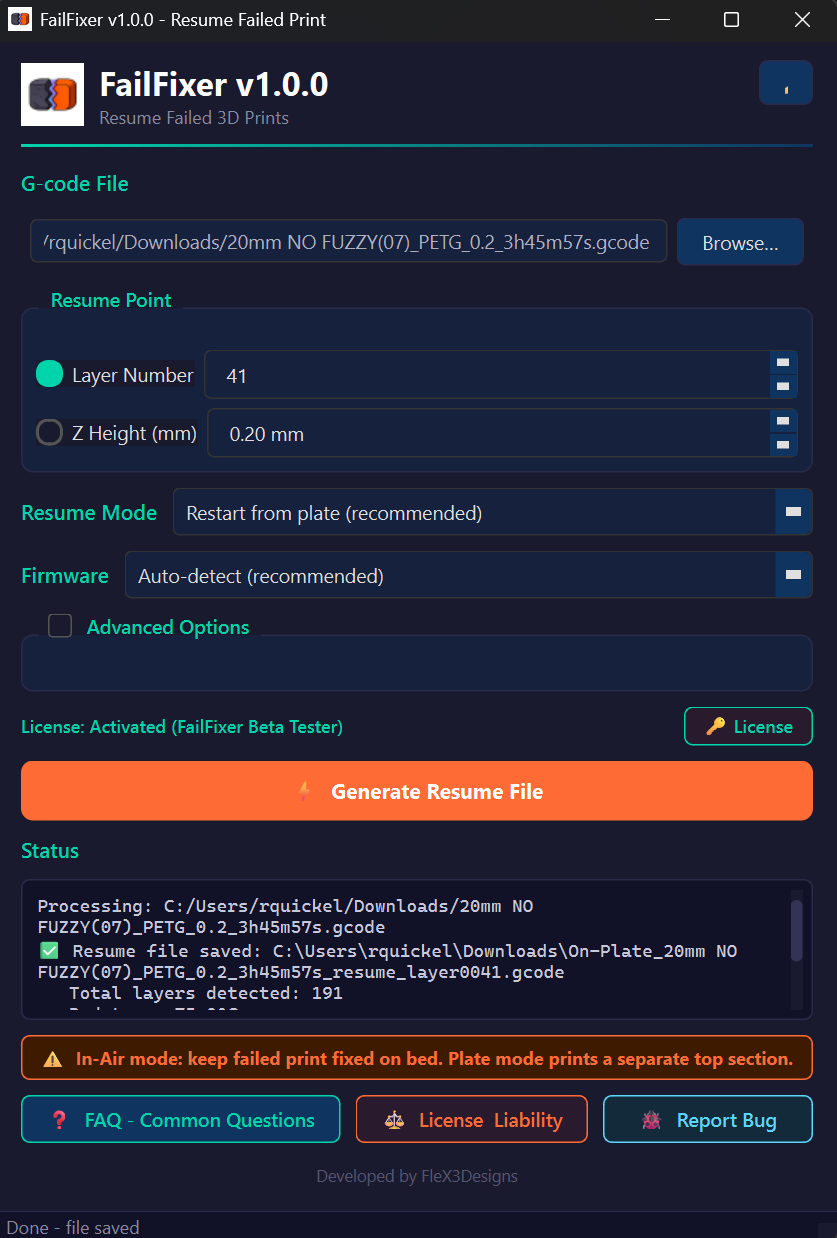
FailFixer reads your original G-code, lets you pick the exact failure layer or Z-height, and generates the right recovery file for your situation.
; --- FailFixer Resume Header ---
; Resume Layer: 142
; Resume Z: 28.40
; Offset: 0.00

M140 S60       ; Bed temp
M104 S210      ; Nozzle temp
M190 S60       ; Wait bed
M109 S210      ; Wait nozzle

G21            ; Millimeters
G90            ; Absolute pos
G28 X Y        ; Home XY only
G1 Z10         ; Safe lift
G92 E0

; --- Your print continues... ---
How It Works
No command line. No G-code gymnastics. Pick your recovery mode, generate, and print.
Open the original .gcode file from your slicer. FailFixer parses all layers in seconds.
Select Resume In-Air for direct continuation, or Restart from Build Plate for glue-later repairs. Then set your layer/Z and optional offset.
FailFixer creates a safe recovery file. Print the output and either continue the part in place or bond the reprinted top section afterward.
Who It's For
Whether you print for fun or profit, failed prints hurt. FailFixer is built for anyone running FDM printers.
Stop losing weekend prints to random failures. Save your filament and your sanity.
When a 20-hour production print fails at 90%, the cost is real. FailFixer pays for itself on the first save.
Schools, makerspaces, and labs — where printers run all day and failures are inevitable.
You know your way around G-code but don't want to manually edit it every time something goes wrong.
License & Activation
After purchase, you get a Lemon Squeezy license key by email. Paste it once in FailFixer and you're ready to go. License is perpetual with up to 5 device activations.
Purchase FailFixer and receive your license key in your receipt email instantly.
Open FailFixer, paste your key in the activation prompt, and click Activate.
Once activated, Generate is unlocked. If internet is down, grace mode keeps you working temporarily.
Pricing
Pay once, use forever. FailFixer is a tool, not a service.
One-time purchase · Lifetime updates for V1
FailFixer saves you time, filament, and frustration — for less than the cost of a coffee.
Become a Beta TesterSupport
Email us anytime at support@failfixer.com or use the quick form below.
If the form shows "activation required", check support@failfixer.com inbox for FormSubmit's one-time activation email and click confirm. You can always email us directly at support@failfixer.com.
 Fail
Fail